Shutter Colors: See Them on Your House Before You Paint
Shutters are one of the cheapest things to repaint and one of the easiest to get wrong. Before you buy paint, you can see blue, white, green or another color on a photo of your own house with AI. This page shows three examples on stand-in houses, lists what published guides suggest for white, brick, tan and other houses, and tells you what a render cannot show.
Free sign-up with email or Google. You get 2 free renders in most countries; free renders are watermarked.
Before and after examples
Example images are AI-generated: both the sample houses and their redesigns. Results change from render to render, so treat them as concepts, not exact product matches.
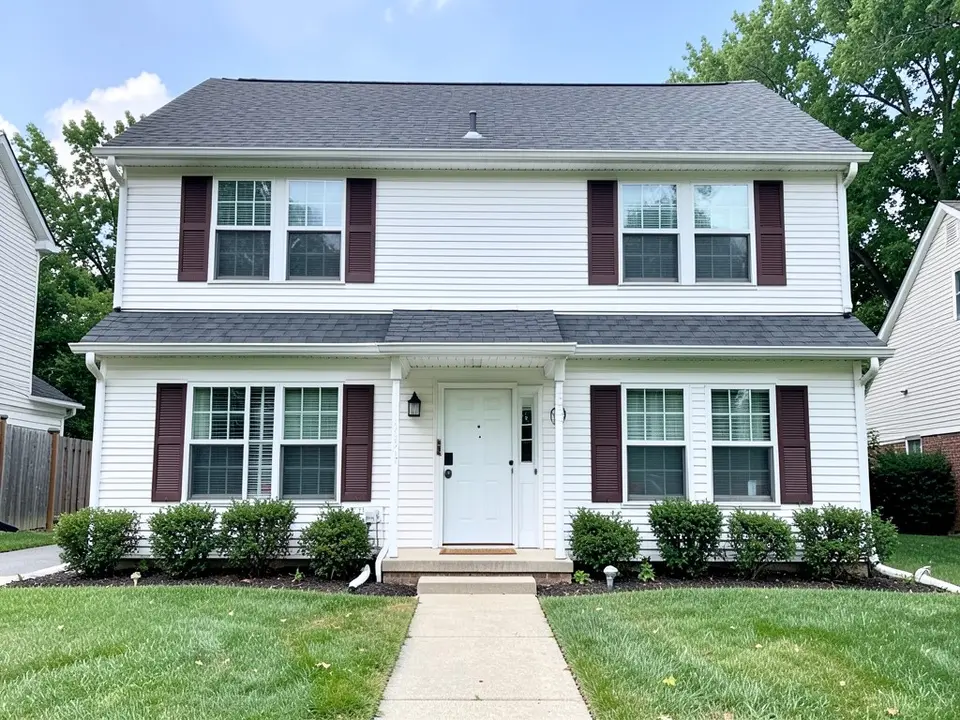 Before
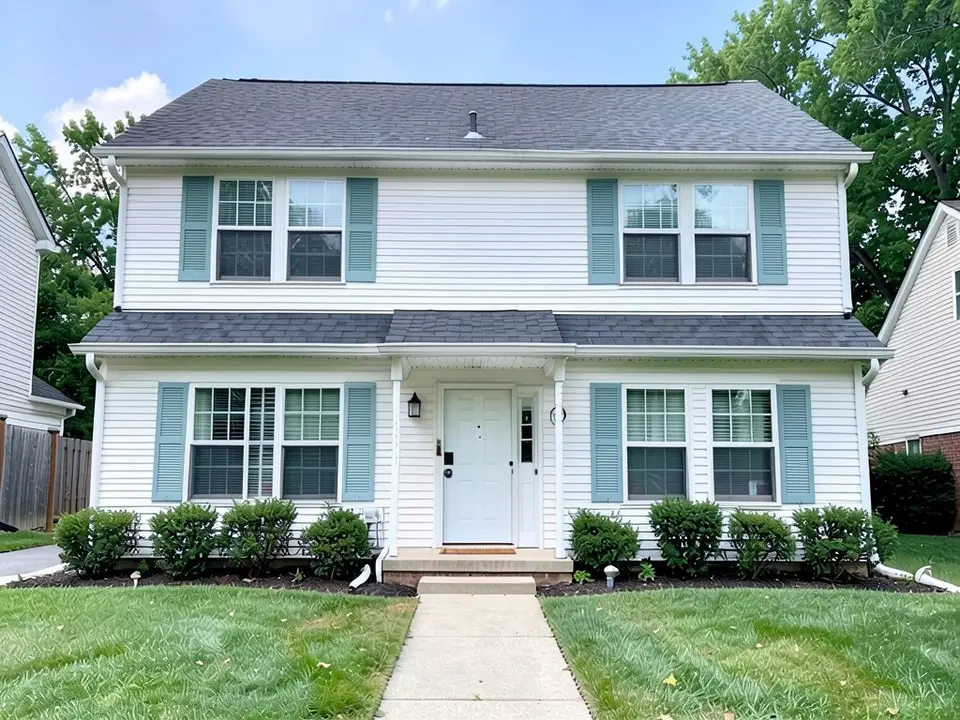 After
After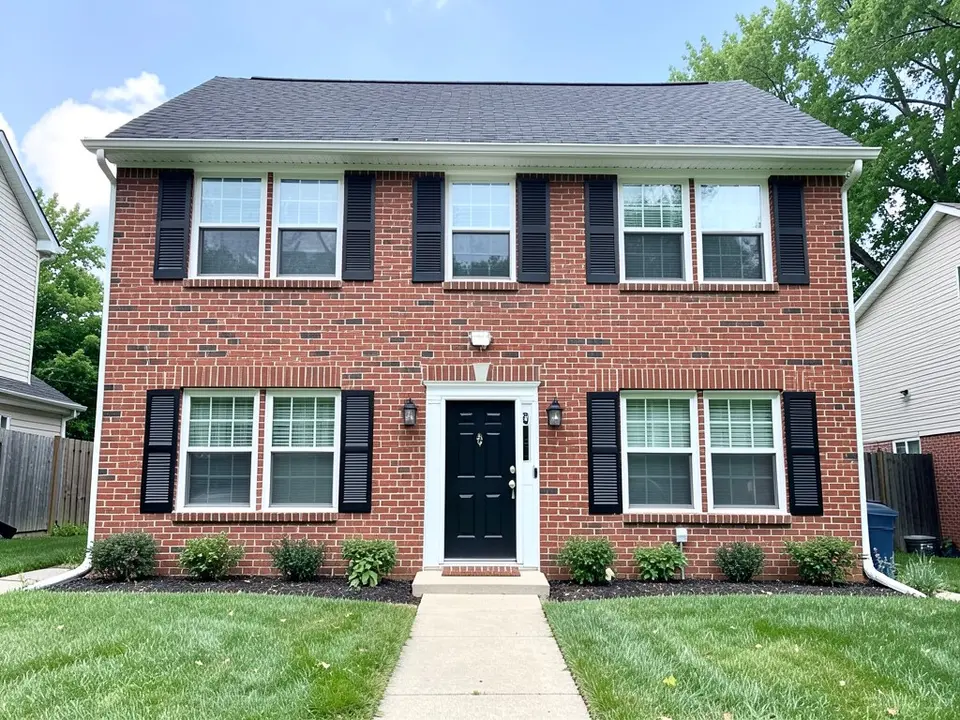 Before
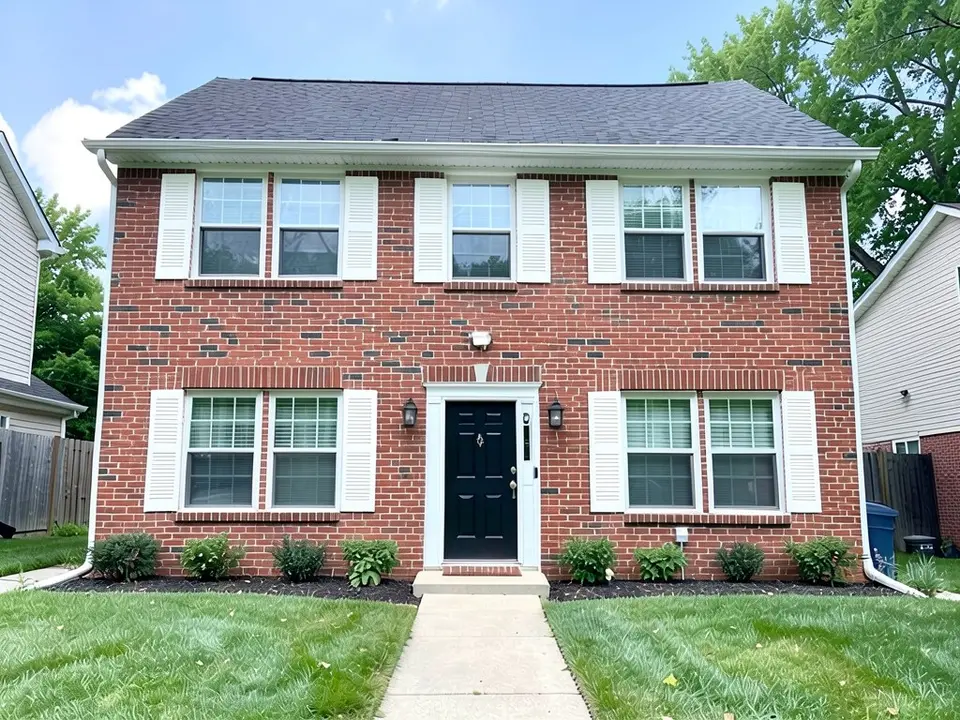 After
After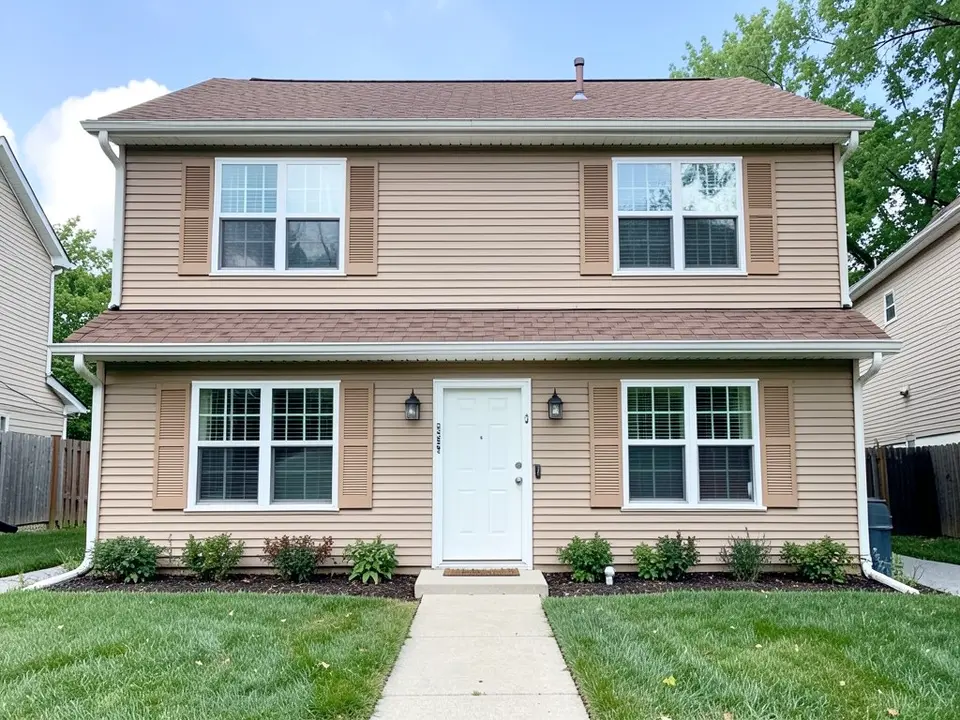 Before
 After
AfterWhat the AI can and cannot do
It can repaint the shutters in your photo a new color while usually keeping their louvered shape, the siding, the trim, the door and the roof as they are, so you can see the color next to your own house.
It cannot match a paint brand's color, show a finish, or tell you how the color looks at different times of day. The examples above also redrew the lawn, as the captions say. Treat each result as a direction to test with a real paint sample.
Shutter colors people suggest, by house
These pairings come from three published pieces: Homestyler, "Choosing the perfect shutter colors" by Lillian Ward (October 22, 2025; Homestyler is a home design software company); Bob Vila, "15 Top-Rated Color Combinations for Your Home Exterior" by Marie Proeller Hueston (updated October 24, 2024); and This Old House, "How To Choose Perfect Exterior Colors for Your Home" (listed as updated June 10, 2026). They are design opinions, not rules.
| Your house | Shutter colors the guides mention |
|---|---|
| White or light gray siding | Clean white works with nearly any siding; black adds architectural flair and charcoal gives a designer look (Homestyler). Bob Vila shows black shutters with white trim on a red house, and slightly more saturated shutters and door on a light gray house. |
| Yellow or beige undertones | Warm cream, to avoid a stark, clinical contrast (Homestyler). |
| Brick, or cream siding with natural wood accents | Deep navy, which Homestyler calls powerful and inviting. |
| Tan stone or natural wood trim | Sage, olive or forest green for a nature-connected look; on darker exteriors, add lighter trim or hardware so the green does not look washed out (Homestyler). |
| Greige (gray-beige) | Teal shutters, as a modern spin on a traditional house (Bob Vila). |
| Any light neutral wall with white trim | A darker color on add-on features like shutters (This Old House). A very dark shade of another color, such as dark green, can read as black from a distance. |
Other tips from the same sources:
- Match the style. Homestyler says traditional homes suit darker shutters for definition and cottage-style homes lighter shutters for a softer effect.
- Balance the door. Homestyler says to keep shutters neutral next to a bold front door, and that a neutral door can take bolder shutters.
- Mind the finish. Homestyler prefers semi-gloss or satin for exterior use because both resist moisture and are easy to clean, and says wood takes paint differently from vinyl or composite, so use a primer recommended for the material.
- Use red sparingly. This Old House says that in a monochromatic scheme, a small amount of red on the front door or shutters adds contrast.
- Treat fixed materials as the starting point. This Old House says to build the palette around existing stone, brick and roof.
Three shutter colors to try
- Dusty blue on white. Example 1 swaps dark maroon-brown shutters on a white house for a dusty blue. It came out greener than the word "blue" suggests, so look at it before you commit.
- White on red brick. Example 2 swaps black shutters on a red brick house for white. Compare it with the black before picture and ask which one you prefer.
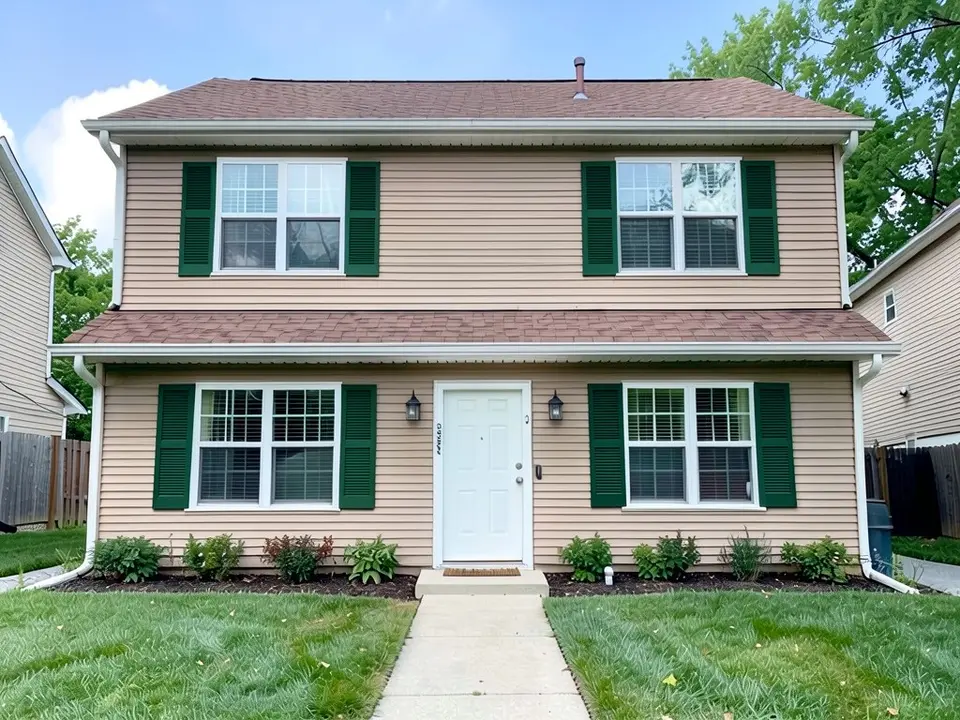
- Forest green on tan. Example 3 replaces tan shutters that blend into tan siding with a deep green, the color family Homestyler suggests for tan exteriors with natural wood trim.
How to try shutter colors on your house
The examples were run directly on an image model, not through this tool, so your results will look different.
- Photograph the front in daylight, straight on, from far enough back that every window with a shutter fits in the frame.
- Open the photo enhancer, upload your photo, keep Standard Enhancement and click Generate Enhancement.
- Click Edit and paste one of the prompts below into Edit Instructions. Name the shutters, their current color, the new color, and list what must stay the same.
- Check the whole image. Count the shutters, look at the trim, the door and the lawn, and run it again if one was missed or something moved.
The enhancement and the edit each use credits, so this route uses both free renders. To restyle the whole outside at once, use the exterior designer.
The exact prompts behind the examples
These are the edit prompts used for the three examples, word for word. Change the colors and the list of what stays to suit your house.
Prompt 1: shutters to dusty blue
Change only the window shutters: repaint every dark brown louvered shutter a muted dusty blue, keeping the louvered shape. Keep the white siding, the white window trim, the white front door, the dark gray roof, the walkway, the lawn, the sky and the camera angle exactly the same.
Prompt 2: shutters to white
Change only the window shutters: repaint every black louvered shutter crisp white, keeping the louvered shape. Keep the red brick walls, the white window trim, the black front door, the dark gray roof, the walkway, the lawn, the sky and the camera angle exactly the same.
Prompt 3: shutters to forest green
Change only the window shutters: repaint every tan louvered shutter a deep forest green, keeping the louvered shape. Keep the tan siding, the white window trim, the white front door, the brown roof, the walkway, the lawn, the sky and the camera angle exactly the same.
Before you paint
- Test a real sample on one shutter and look at it in daylight, next to your siding, trim and roof.
- Check your HOA or town. Some limit exterior colors, including shutter colors.
- Decide on the hardware and the door too. The shutters, door and trim are read together.
Who this is for
Homeowners who want a fresh look for the price of some paint, sellers who want to pick a color without guessing, and anyone stuck between two or three shutter colors who wants to see them on their own house first.
More exterior color ideas
See the front door colors page for the door between them, the exterior trim colors page for window and corner trim, the siding colors page for the walls, the garage door colors page for the door next to the shutters, and the home exterior visualizer page for changing several things at once.
You can also read the metal roof colors and the exterior house colors with a brown roof pages.
Frequently asked questions
What color shutters go with a white house?
Homestyler says clean white works with nearly any siding, that black shutters add architectural flair, and that charcoal on a white or light gray house gives a designer look. Bob Vila's color-combination guide shows black shutters with white trim on a red house. Example 1 above tries a muted blue on a white house, which is our own try and not a recommendation from those guides.
What color shutters go with a brick house?
Homestyler says deep navy pairs well with brick or cream siding that has natural wood accents. This Old House says to treat existing materials such as brick and stone as the foundation of the palette. Example 2 above puts white shutters on red brick, our own try. Check any choice against your own brick, because brick colors vary a lot.
What color shutters go with a tan or beige house?
Homestyler suggests warm cream shutters on yellow or beige undertones to avoid a stark contrast, and sage, olive or forest green for tan stone or natural wood trim. Example 3 above tries forest green on tan siding. Shutters painted nearly the same color as the walls, as in the before picture of Example 3, tend to disappear into them.
Should shutters be darker or lighter than the house?
Homestyler says darker shutters give definition and depth, and that lighter shutters give a softer effect. This Old House suggests a darker color on add-on features like shutters, set against light neutral walls and white trim. The right answer depends on your house, so preview both.
Should shutters match the front door?
They do not have to. Homestyler says that if you have a bold front door, keep the shutters neutral, and that a neutral door can take bolder shutters. The front door colors page on this site shows doors on their own.
Can black shutters be a dark green instead?
This Old House says a very dark shade of another color, such as dark green, can read as black from a distance, for a softer look than true black. Try it on your photo to see how it reads next to your roof and trim.
Can I preview shutter colors on my own house?
Yes. Upload a photo of your house, then ask the editor to change only the shutters to a color you name and to keep everything else the same. The result is a concept of the color, not a paint match, so test a real sample on a shutter before you buy paint.
Will the render match the paint color I pick?
No, not exactly. In the examples above the blue came out greener than the words suggest, and the white and the green came out close to what we asked for. Use the render to choose a direction, then look at a real sample in daylight.
Is this tool free?
Signing up is free and gives you 5 credits, which is enough for 2 renders in most countries. Free renders carry an AiExterior watermark. If you want more renders or clean images, paid plans are available on the pricing page.
Do I need an account?
Yes. You need to sign in before a render starts, with an email code or your Google account.
Try it on your own house
Upload a photo of your houseFree sign-up with email or Google. You get 2 free renders in most countries; free renders are watermarked.