Exterior Trim Colors: See Them on Your House Before You Paint
Trim is a small part of the house that changes how the whole front reads: white feels crisp, black feels sharp, a deep green feels settled. Before you paint, you can see a new trim color on a photo of your own house with AI. This page shows three examples on stand-in houses, summarizes what two published sources say about choosing trim, and tells you what a render cannot show.
Free sign-up with email or Google. You get 2 free renders in most countries; free renders are watermarked.
Before and after examples
Example images are AI-generated: both the sample houses and their redesigns. Results change from render to render, so treat them as concepts, not exact product matches.
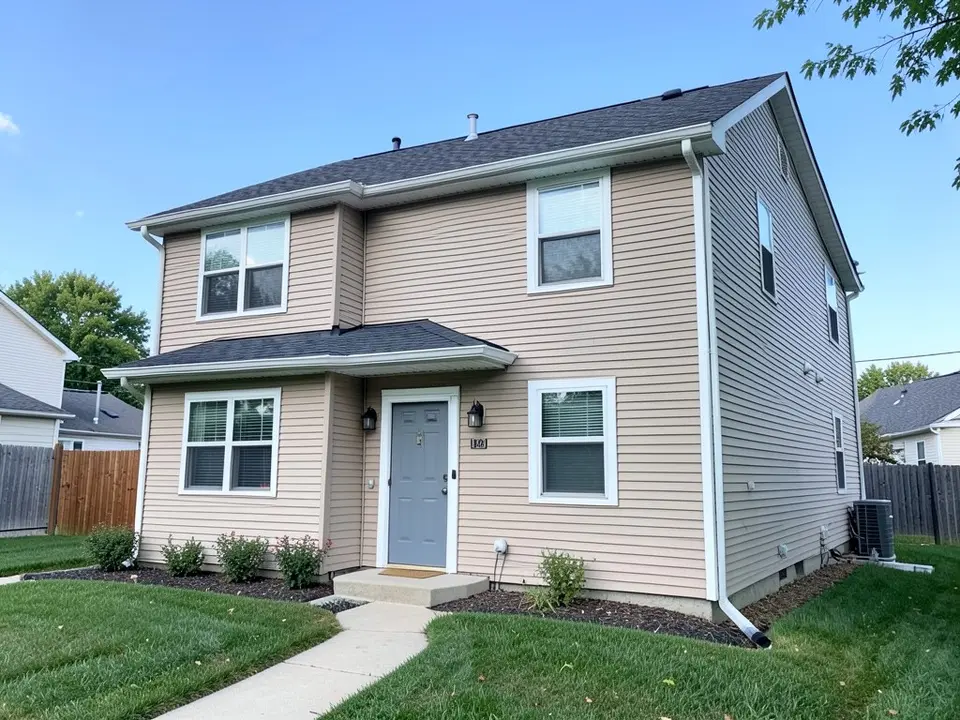 Before
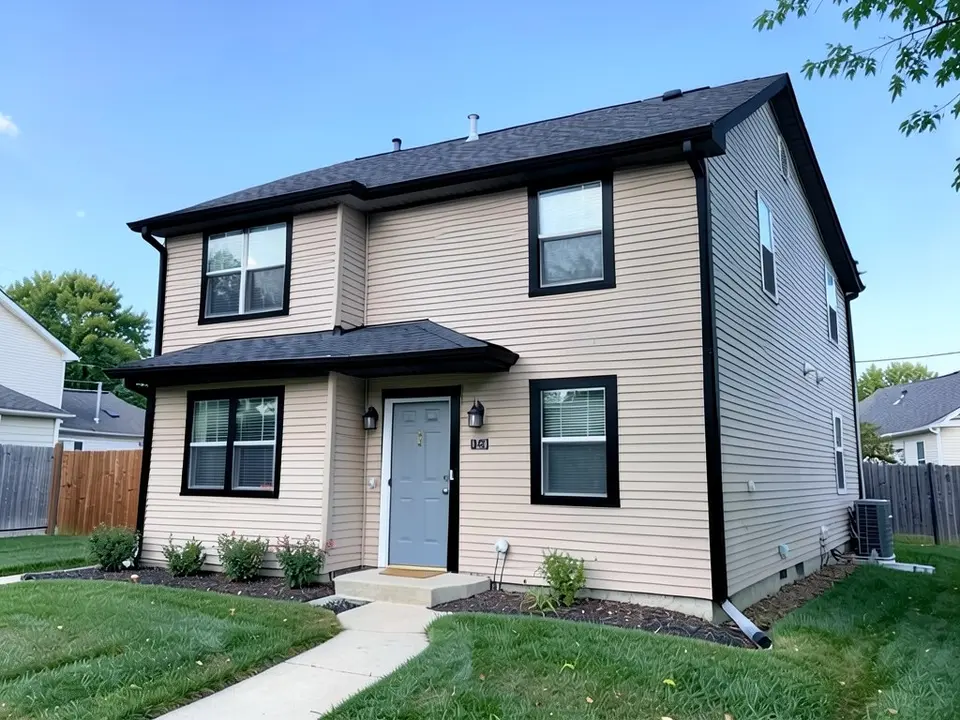 After
After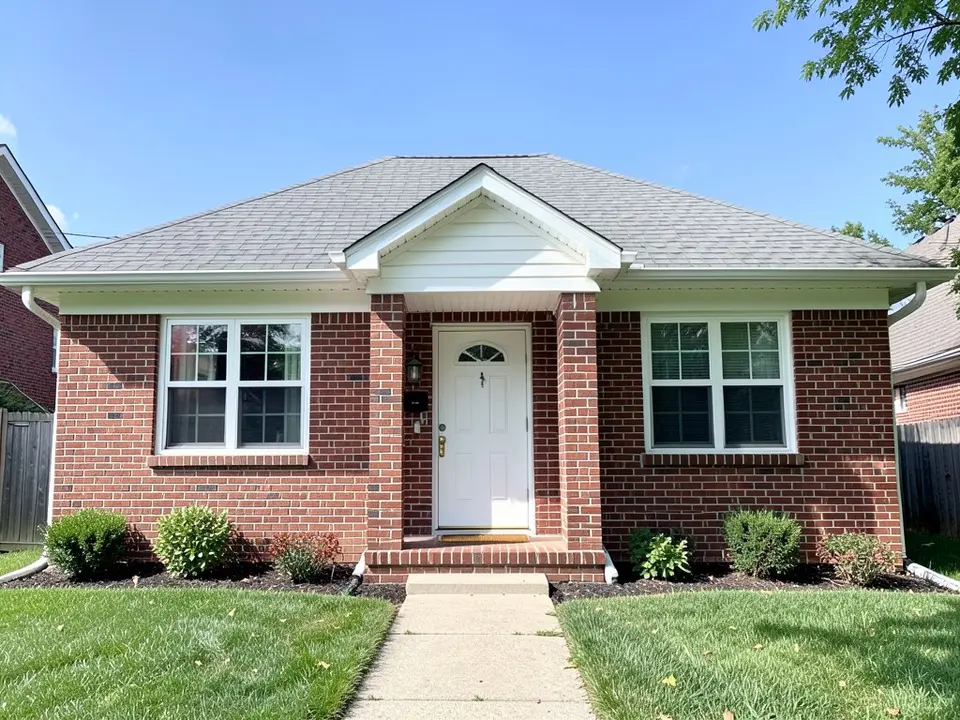 Before
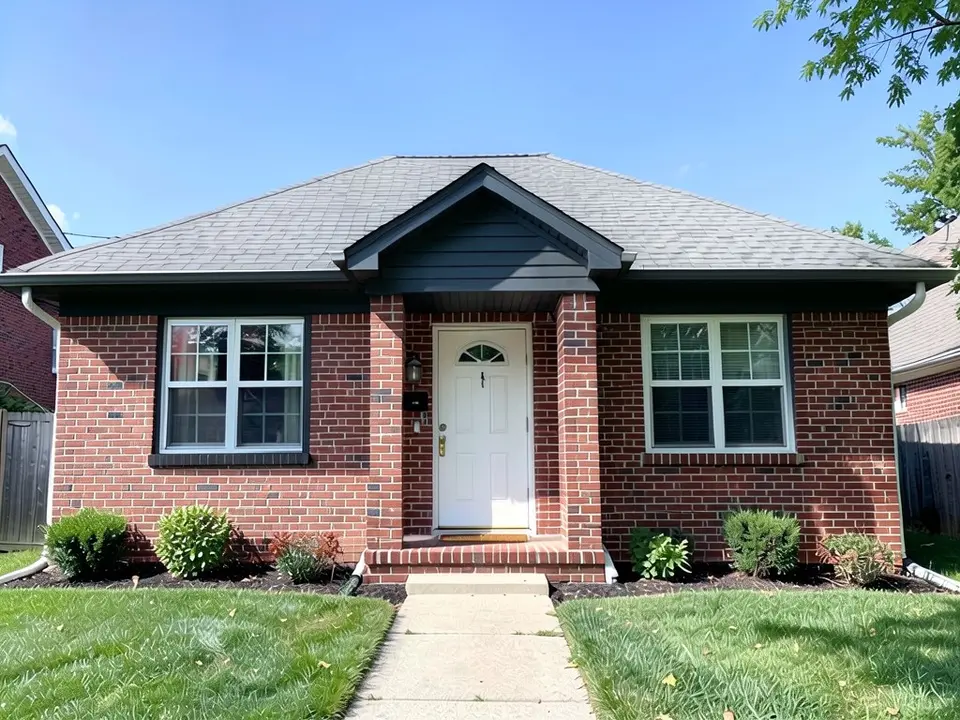 After
After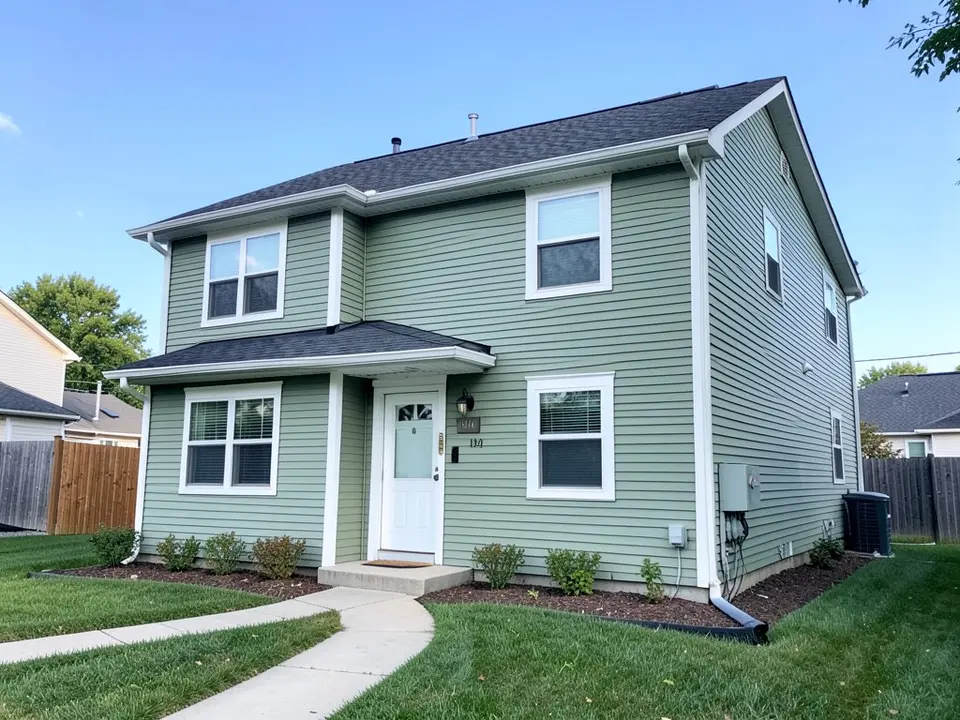 Before
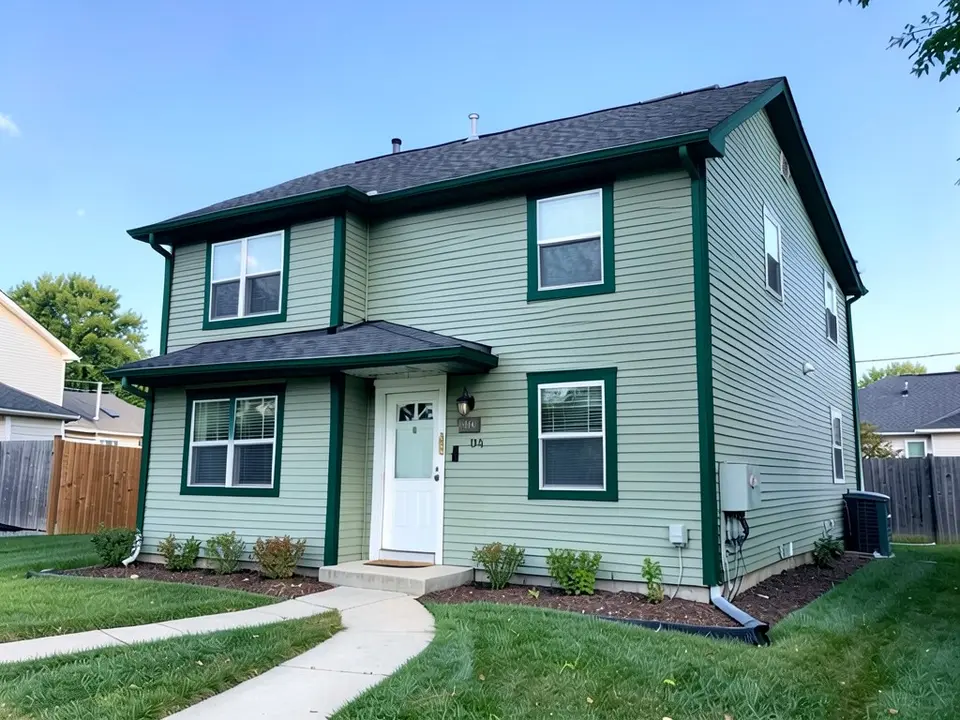 After
AfterWhat the AI can and cannot do
It can repaint the window and corner trim in your photo a new color while usually keeping the siding, windows, doors and roof as they are, so you can judge a contrast before you paint.
It cannot match a paint brand's color or know which parts of your house you call trim. In all three examples above it also repainted a part the prompt did not name, such as the fascia, the downspout or a gable, and it redrew the lawn. Check the whole image and list the exact parts to change.
How to pick a trim color
The advice below comes from two published sources: brick&batten, "The 12 Best Exterior Trim Paint Colors for Your Home" by Mackenzie (February 12, 2024), and Gentek Canada, "4 Tips to Help Choose an Exterior Trim Colour for Your Home". Gentek sells siding and trim products, so weigh its tips with that in mind. These are design opinions, not rules.
| Approach | What the sources say |
|---|---|
| Contrast | Charcoal trim on red brick, or black trim on modern beige siding (brick&batten). Black trim with white siding, or white trim on dark charcoal or brown siding; a brighter white gives more contrast (Gentek). |
| Subtle | A shade a couple of steps lighter or darker than the siding, from the same color family (Gentek), such as a deeper sage trim on sage siding (brick&batten). |
| Pull from what is there | Trim can echo stone in the landscaping or the undertones in the brick, and can be matched to gutters, fences, shutters, railings or stairs (brick&batten). |
| Where the colors go | Gentek suggests painting eave ceilings the siding color and outward-facing cornices the trim color, blending gutters and downspouts with the adjacent color, and making window sashes and shutters the darkest shade so windows recede. |
brick&batten also notes that trim can draw the eye to features such as a roofline peak, and that natural light, undertones and fixed elements such as brick change how a color looks outdoors, so sample before you commit.
Three trim colors to try
- Black on beige. Example 1 is the contrast look on a beige house. Notice how the black picks out the window shapes and the roofline.
- Charcoal on red brick. Example 2 tries charcoal trim on brick. The gable turned dark too, and only one of the two windows got dark trim, so decide which parts you want dark before you paint.
- Deep green on sage. Example 3 is a same-family idea taken further: a deep green on sage siding. It is bolder than the subtle option, so compare it with a lighter green.
How to try an exterior trim color on your house
The examples were run directly on an image model, not through this tool, so your results will look different.
- Photograph the front in daylight, straight on, from far enough back that the whole house fits in the frame.
- Open the photo enhancer, upload your photo, keep Standard Enhancement and click Generate Enhancement.
- Click Edit and paste one of the prompts below into Edit Instructions. Name the one thing to change, its new color, and list what must stay the same.
- Check the whole image. Look at the trim, the windows and the lawn, and run it again if something moved.
The enhancement and the edit each use credits, so this route uses both free renders. To restyle the whole outside at once, use the exterior designer.
The exact prompts behind the examples
These are the edit prompts used for the three examples, word for word. Change the color and the list of what stays to suit your house.
Prompt 1: black window and corner trim
Change only the exterior trim: repaint the white window trim and corner trim black. Keep the beige siding, the gray front door, the glass in every window, the dark gray roof, the walkway, the lawn, the sky and the camera angle exactly the same.
Prompt 2: charcoal trim, fascia and eaves
Change only the exterior trim: repaint the white window trim and white fascia and eaves a dark charcoal gray. Keep the red brick, the white front door, the glass in every window, the gray roof, the walkway, the lawn, the sky and the camera angle exactly the same.
Prompt 3: deep green window and corner trim
Change only the exterior trim: repaint the white window trim and corner trim a deep dark green. Keep the sage green siding, the white front door, the glass in every window, the dark gray roof, the walkway, the lawn, the sky and the camera angle exactly the same.
Before you paint
- Test real samples. Gentek suggests painting poster board with your top three shades and propping them against the house in full sun.
- Decide what counts as trim (fascia, gutters, door frames, corner boards) before you ask for a quote.
- Check your HOA or town. Some limit exterior colors.
Who this is for
Homeowners repainting or re-siding who are unsure whether white, black or a color looks best on the trim, and anyone who wants to see a contrast on their own house before they buy paint.
More exterior color ideas
See the front door colors and garage door colors pages for the doors, the siding colors page for the walls, and the home exterior visualizer page for changing several things at once.
You can also read the shutter colors, the James Hardie siding colors and the exterior house colors with a brown roof pages.
Frequently asked questions
What is the best exterior trim color?
The sources we read do not name one. brick&batten says classic neutrals such as white, gray and black are timeless and that bolder, eclectic hues are on trend. Gentek says to base the trim on the siding color. Preview two or three on a photo of your own house.
What trim color goes with beige siding?
brick&batten gives black trim on modern beige siding as a contrast option, and Gentek says black trim with white siding or white trim with dark siding are options. Example 1 above tries black trim on a beige house.
What trim color goes with red brick?
brick&batten suggests charcoal trim on red brick for contrast, and says trim can echo the undertones in the brick. Example 2 above tries charcoal trim on a red brick house.
Can trim be the same color as the siding?
Yes. Gentek suggests a subtle look using a shade a couple of steps lighter or darker than the siding, from the same color family, and brick&batten gives a deeper sage trim on sage siding as an example. Example 3 above uses a much darker green on sage siding, which is stronger than a subtle step.
Should windows and shutters be the darkest color?
Gentek suggests making window sashes and shutters the darkest shade so the windows recede. That is one opinion; trim and sash colors are a style choice.
Which parts of the house count as trim?
Window and door surrounds and corner boards are the usual parts, and brick&batten also mentions matching gutters, shutters, railings and stairs to the trim for cohesion. Gentek says to blend gutters and downspouts with the adjacent color. Our renders sometimes paint the fascia, gutters and door frame too, so list exactly which parts to change.
Can I preview trim colors on my own house?
Yes. Upload a photo of your house and ask the editor to repaint only the trim parts you name, and to keep the siding, doors, roof and windows the same. Then check what else moved: in the examples above the render also repainted parts the prompt did not name.
Will the render match a real paint color?
No, not exactly. Use the render to choose a direction, then follow the advice from Gentek: test your top three shades on poster board propped against the house in full sun.
Is this tool free?
Signing up is free and gives you 5 credits, which is enough for 2 renders in most countries. Free renders carry an AiExterior watermark. If you want more renders or clean images, paid plans are available on the pricing page.
Do I need an account?
Yes. You need to sign in before a render starts, with an email code or your Google account.
Try it on your own house
Upload a photo of your houseFree sign-up with email or Google. You get 2 free renders in most countries; free renders are watermarked.